
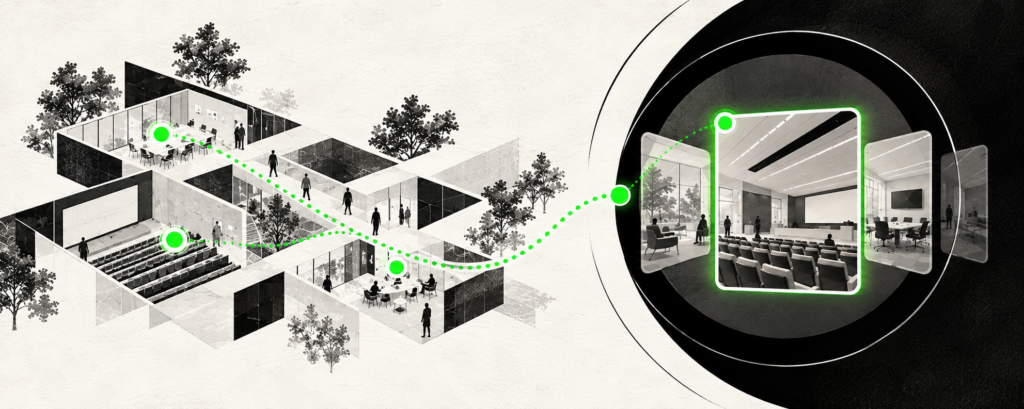
A remote industrial site in Australia. A multi-building executive learning centre. A specialist medical facility with restricted areas. A convention centre whose halls and meeting spaces connect in different ways.
Some are difficult to reach. Others are simply difficult to understand through a set of photographs or a predetermined video tour. And the people looking at them rarely have identical questions.
A technical partner may want to inspect an approved work area. A visiting faculty member may be interested in particular learning spaces. An event organiser needs to understand how people will move between halls. One film can offer a useful introduction, but can it answer all three?
When a video isn’t quite enough
A good film can convey a facility’s character, scale and purpose quickly. For many organisations, that may be all that is needed. But a fixed sequence gives everyone the same journey, even when their reasons for looking are different.
An interactive virtual walkthrough can offer another approach: visitors choose among connected 360-degree viewpoints, select rooms or zones from a menu or plan, look around, return to earlier spaces and open contextual information when it matters to them.
That freedom is deliberately bounded. The organisation decides which viewpoints and information are available. The visitor decides how to explore what has been made accessible.
Where that becomes valuable
Remote and difficult-to-access facilities
Across geographically dispersed regions such as Australia, industrial facilities, research centres and infrastructure sites can be far from the people who need to understand them. Distance is not the only barrier: safety procedures, operational schedules and access restrictions may also make visits difficult.
Consider a technical stakeholder preparing for a discussion about a remote facility. Exploring approved operational areas and opening explanations at relevant points could help them arrive with better questions. In a complex medical facility, a comparable walkthrough might help newly assigned staff understand permitted circulation routes and public-facing areas, or help patients and families become familiar with entrances, waiting areas and other spaces before arrival.
Those are different audiences and objectives, but the same underlying opportunity: make an unfamiliar environment more understandable before someone needs to navigate it. A virtual introduction cannot replace required site induction, clinical advice, safety procedures or an in-person inspection.
Corporate learning and development environments
An executive education or corporate L&D campus may contain far more than classrooms: auditoriums, leadership development spaces, collaborative rooms, laboratories, studios and other specialist facilities. The building is one place, but its relevance changes with the viewer.
A learning director may want to assess available spaces. Visiting faculty may concentrate on teaching environments. An institutional partner may be interested in how the wider campus supports a programme. A curated walkthrough can let each follow a different route and access information about how particular spaces are intended to be used.
The point is not merely to show an impressive campus. It is to help different stakeholders judge whether its facilities answer the questions that brought them there.
Different places, different reasons to explore
Manufacturing partners might need an introduction to selected production or testing areas before a technical conversation. Prospective students considering specialist higher-education programmes may want to examine laboratories or studios. Exhibition and convention organisers may need to see how halls, breakout rooms and access points relate to one another while planning an event.
The same approach can help orient employees before entering a complex workplace. Evaluation, planning, familiarisation and communication are distinct purposes. The format becomes useful when it lets someone pursue the information relevant to theirs.
From facility overview to useful detail
This does not require a fully modelled, freely navigable 3D environment. A practical walkthrough can connect photographed or filmed 360-degree viewpoints with menus, a floor or zone selector, and information hotspots.
A visitor might start with a facility overview, choose a learning wing, explore a selected classroom viewpoint and then open relevant information about seating, equipment or related rooms. The progression is from the whole place, to a particular space, to the detail that helps answer a question.
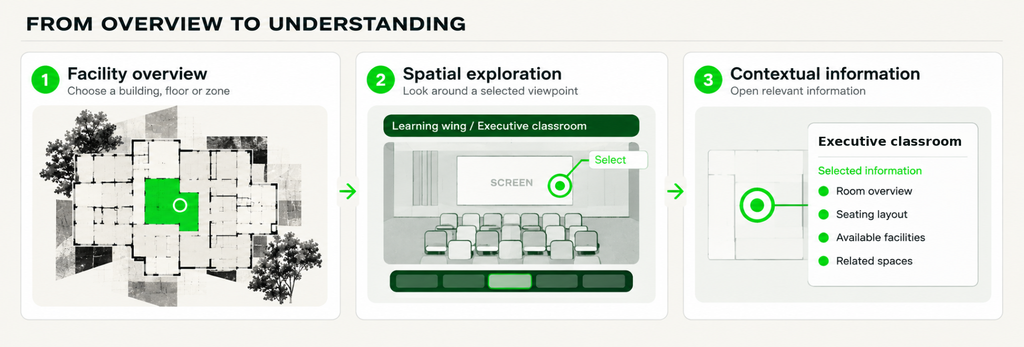
From facility overview to spatial exploration to contextual information. Illustrative, fictional facility; exact features vary by project.
This is not the same as walking anywhere inside a digital twin. Viewpoints are curated, and what is revealed can be limited. VR headsets may offer a more spatial presentation, while browser access may be the practical route for stakeholders using their own devices.
When simpler is better
Interactivity is not automatically an improvement. If the site is straightforward or the audience does not need to explore independently, photographs, a floor plan, a short film or a live guided call may be sufficient. Some decisions will still require physical inspection.
Interactive walkthroughs also create responsibilities: information must be kept current, navigation must remain easy to understand, and sensitive or restricted areas should be excluded or appropriately controlled. The extra effort is justified only when the freedom to explore genuinely helps.
A visit isn’t always the destination
Sometimes an initial journey can be avoided. At other times, the value is in preparing for an eventual visit, assessing a facility, planning an event or becoming familiar with a place before arriving.
The better question is not simply, “Can we put this building online?” It is, “What could someone understand better if they could choose where to look, what to examine and when to go deeper?”